
TP-Link TL-SG105S-M2 vs TP-Link TL-SG108E
Do you need 2.5GbE links, configurable VLAN and diagnostic functions, or both?
Products compared

ASIN B0CMXXPTVH
TP-Link TL-SG105S-M2
Your planned endpoints support 2.5GbE and you want unmanaged expansion.
Last observed offer
$39.99
- Confirm offer eligibility on Amazon
Size: 5 Port, 2.5 Gigabit
Price checked
Observed condition: new. Coupon and subscription requirements unverified.
ASIN B00K4DS5KU
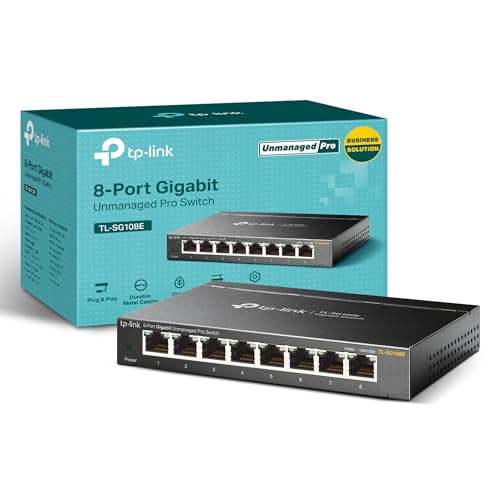
TP-Link TL-SG108E
You want to configure VLANs or use mirroring and cable diagnostics on a gigabit switch.
Last observed offer
$27.99
List Price: $39.99
- Confirm offer eligibility on Amazon
Size: 8 Port (Pack of 1)
Price checked
Observed condition: new. Coupon and subscription requirements unverified.
Prices are per listed package. Pickoryx may earn a commission from qualifying purchases through the paid Amazon links on this page, at no added cost to you.
Published by Pickoryx · Published 2026-10-07 · Source checked 2026-10-07 21:32 UTC
The main trade-off
The TL-SG105S-M2 offers 2.5GbE unmanaged expansion; the TL-SG108E offers configuration functions at gigabit link rates.
Quick verdict
Choose the TL-SG105S-M2 for 2.5GbE links and unmanaged setup. Choose the TL-SG108E when gigabit links suffice and you need configurable VLANs or diagnostic tools. Its extra controls do not add 2.5GbE support.
Choose TP-Link TL-SG105S-M2 if
- Your planned endpoints support 2.5GbE and you want unmanaged expansion.
Choose TP-Link TL-SG108E if
- You want to configure VLANs or use mirroring and cable diagnostics on a gigabit switch.
When the recommendation changes
- If both 2.5GbE links and configurable VLANs are requirements, neither selected model meets the combination.
The differences that matter
| Decision point | TP-Link TL-SG105S-M2 | TP-Link TL-SG108E |
|---|---|---|
| Negotiated Link Rate Requirements | 100Mbps, 1Gbps and 2.5Gbps auto-negotiation.[1, 2] | 10Mbps, 100Mbps and 1Gbps auto-negotiation.[3, 4] |
What this changes: The TL-SG105S-M2 fits planned 2.5GbE links; the TL-SG108E fits gigabit links. These specifications do not predict actual file-transfer speed.[1, 2, 3, 4] The better fit depends on your priorities | ||
| User Configurable Switch Functions | Manufacturer-defined unmanaged switch with plug-and-play setup; built-in QoS and IGMP snooping are listed.[1, 2] | Configurable VLAN functions, port mirroring and cable diagnostics; basic plug-and-play use is also supported.[3, 4] |
What this changes: Configuration needs can decide this choice even on an entirely gigabit network: choose the TL-SG108E for those controls, or the TL-SG105S-M2 for unmanaged expansion.[1, 2, 3, 4] The better fit depends on your priorities | ||
Best for your routine
A 2.5GbE-capable PC and NAS on a network needing unmanaged expansion
Best fit: TP-Link TL-SG105S-M2
Based on listed features, not comparative testing.
The TL-SG105S-M2 supports the intended link rate. Check the endpoint ports, cabling and intervening links; throughput is not guaranteed.
A gigabit network where the buyer needs configurable VLANs or diagnostics
Best fit: TP-Link TL-SG108E
Based on listed features, not comparative testing.
The TL-SG108E supplies those controls, with gigabit rather than 2.5GbE ports.
Value and trade-offs
One or both observed offers have eligibility conditions, so no unrestricted price difference is shown.
Pay for the function your network needs. A lower price cannot compensate for a missing required link rate or configuration workflow.
Insufficient price history for a buy-now or wait recommendation; compare current offers.
Limitations
- Retail hardware revisions were not established. The TL-SG108E comparison uses functions documented on both V1 and V6 pages; check your unit’s revision before choosing software or following setup instructions.
- No hands-on throughput, latency or reliability tests were performed. Port negotiation rates are not guaranteed internet or file-transfer speeds.
- VLAN support alone does not establish network security or isolation; the wider network configuration matters.
Questions shoppers ask
Does “unmanaged” mean the TL-SG105S-M2 lacks QoS or IGMP snooping?
No. TP-Link lists both as built-in features. The distinction here is unmanaged operation versus the TL-SG108E’s configurable VLAN and diagnostic functions.
Must I configure the TL-SG108E just to add wired connections?
No. TP-Link also documents basic plug-and-play use. Configuration is relevant when you want its additional controls; use instructions for the actual hardware revision.
Methodology and sources
Compared supported link rates and configuration functions, cross-checking shared TL-SG108E features across V1 and V6 documentation.
AI assisted source comparison and drafting.
View 4 sources
- 1.TL-SG105S-M2 | 5-Port 2.5G Multi-Gigabit Desktop SwitchTP-Link · Official specifications · Source checked 2026-10-07 21:32 UTC
Evidence used on this page
- Plug and Play; Hardware Features / Interface; Software Features: Lists 100Mbps/1Gbps/2.5Gbps auto-negotiation and plug-and-play deployment, with QoS and IGMP snooping.
- 2.TL-SG105S-M2 Unmanaged Switch DatasheetTP-Link · Official specifications · Source checked 2026-10-07 21:32 UTC
Evidence used on this page
- Page 1 heading; page 2 Interface and Advanced Features: Explicitly identifies this exact model as unmanaged and corroborates its link rates and built-in features.
- 3.TL-SG108E V6 | 8-Port Gigabit Easy Smart SwitchTP-Link · Official specifications · Source checked 2026-10-07 21:32 UTC
Evidence used on this page
- Hardware Features / Interface; Software Features / VLAN and L2 Features: Lists gigabit auto-negotiation, VLAN configuration, port mirroring and cable diagnostics. V6 page does not identify the retail unit revision.
- 4.TL-SG108E V1 | 8-Port Gigabit Unmanaged Pro SwitchTP-Link · Official specifications · Source checked 2026-10-07 21:32 UTC
Evidence used on this page
- Overview / Additional Software Features; Hardware Features / Interface: V1 page corroborates gigabit links, VLAN functions, mirroring and diagnostics, despite the Unmanaged Pro label. Used only for shared functions.