
Synology DiskStation DS225+ vs Synology DiskStation DS223j
Does the DS225+ justify its premium for this household, or will the DS223j cover the planned NAS jobs?
Products compared

ASIN B0FB7KQLR1
Synology DiskStation DS225+
Your router or switch and the computers accessing the NAS support 2.5GbE end to end.
Last observed offer
$364.29
- Confirm offer eligibility on Amazon
Size: DS225+ (Diskless)
Price checked
Observed condition: new. Coupon and subscription requirements unverified.
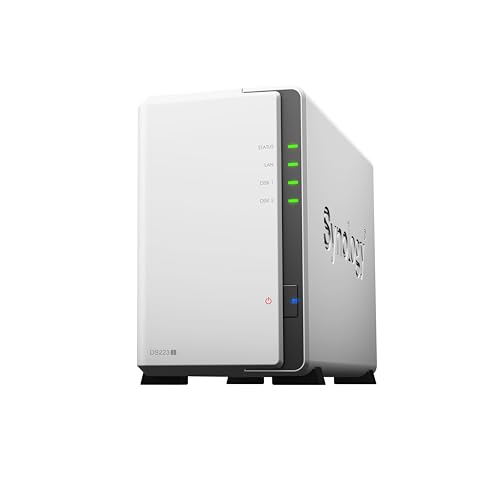
ASIN B0C8814GKB
Synology DiskStation DS223j
Your home network tops out at Gigabit and you mainly need shared folders, mobile or computer backups, and media storage.
Last observed offer
$209.99
- Confirm offer eligibility on Amazon
Size: 2-bay
Price checked
Observed condition: new. Coupon and subscription requirements unverified.
Prices are per listed package. Pickoryx may earn a commission from qualifying purchases through the paid Amazon links on this page, at no added cost to you.
Published by Pickoryx · Published 2026-11-05 · Source checked 2026-11-05 18:21 UTC
The main trade-off
The DS225+ adds a 2.5GbE port and a documented memory expansion path; the DS223j keeps the same basic two-bay and Hyper Backup role with a simpler listed hardware configuration.
Quick verdict
For a Gigabit home network and straightforward shared storage or backup, the DS223j is the restrained fit: Synology lists two SATA bays for both and describes backup workflows on each model page. Consider the DS225+ when you can use its 2.5GbE port or its explicitly documented memory expansion path. Neither spec sheet proves which will feel faster with your files, drives, or applications.
Choose Synology DiskStation DS225+ if
- Your router or switch and the computers accessing the NAS support 2.5GbE end to end.
- You have a service requirement that makes the DS225+'s listed 2GB RAM, single slot, and 6GB maximum relevant.
Choose Synology DiskStation DS223j if
- Your home network tops out at Gigabit and you mainly need shared folders, mobile or computer backups, and media storage.
- You would rather avoid paying for network and memory options you do not expect to use.
When the recommendation changes
- Choose DS225+ only if the network path has compatible 2.5GbE equipment or the specific service you plan to use benefits from its listed memory capacity; a faster NAS port alone does not upgrade the rest of the network.
- If you need a measured real-world speed or transcoding verdict, neither model's specifications settle that question; compare a controlled test for your clients, drives, and workload.
The differences that matter
| Decision point | Synology DiskStation DS225+ | Synology DiskStation DS223j |
|---|---|---|
| Network And Workflow Fit | One 2.5GbE LAN port and one 1GbE LAN port.[1] | One 1GbE LAN port; the official comparison lists no 2.5GbE port.[1] |
What this changes: The DS225+ gives a compatible multi-gig home network an additional connection option. The benefit depends on the switch/router, client adapter, cabling, drives, and workload; it is not proof of higher real-world transfer speeds.[1] The better fit depends on your priorities | ||
| Memory And Service Fit | 2GB DDR4 non-ECC memory, one slot, and a listed maximum of 6GB (2GB + 4GB). Synology cautions that non-Synology expansion can affect full warranty and technical support.[1] | 1GB DDR4 non-ECC memory; the comparison page does not list a memory slot or expansion maximum for this model.[1] |
What this changes: Choose based on the memory requirements of a specific planned service, not a general assumption that one model handles every workload better. The DS223j's undocumented expansion status remains unknown here.[1] The better fit depends on your priorities | ||
| Diskless Storage And Software Requirements | Two SATA drive bays; Synology describes scheduled backups of NAS data, applications, and configurations to local or remote servers, external drives, or cloud destinations.[1, 3] | Two SATA drive bays; Synology describes shared files and mobile photo backup, with Hyper Backup to multiple destinations.[1, 2] |
What this changes: Both have documented backup options alongside two-bay storage, so the presence of a backup feature alone does not settle the choice. Compare the exact jobs and destinations you need, then configure a separate backup copy.[1, 3, 2] No clear winner | ||
| Memory And Service Fit | Three-year hardware warranty; an extended option is listed.[1] | Two-year hardware warranty; an extended option is listed.[1] |
What this changes: The DS225+ includes one additional year of standard hardware-warranty coverage, which may matter if coverage duration affects your purchase; it does not establish a reliability advantage.[1] The better fit depends on your priorities | ||
Best for your routine
A home with a working 2.5GbE network path and a reason to use multi-gig connectivity
Best fit: Synology DiskStation DS225+
Based on listed features, not comparative testing.
The DS225+ is the only one of these two whose official specification lists a 2.5GbE LAN port. Real transfer rates still depend on the full path and workload.
Straightforward file sharing and backup on a Gigabit home network
Best fit: Synology DiskStation DS223j
Based on listed features, not comparative testing.
The DS223j's listed 1GbE port matches a Gigabit network, and its official page documents shared files and backup workflows. If the current offer price for the DS225+ is higher, skip that extra cost when you do not need its listed multi-gig port or memory option.
Value and trade-offs
One or both observed offers have eligibility conditions, so no unrestricted price difference is shown.
If the current DS225+ offer costs more, that extra spend is easiest to justify when its 2.5GbE port, documented memory option, or longer standard warranty solves a requirement you actually have; absent those needs, the official two-bay and backup listings show a capable baseline in the DS223j.
No price-history window was supplied, so this comparison cannot support a Buy Now or Wait timing recommendation. Check current offers and included drives before purchasing.
Limitations
- This is a feature-fit comparison based on Synology's current model specifications and software listings, not a hands-on or matched performance test. The listed network ports do not guarantee a transfer rate; client/network equipment, drives, configuration, and workload matter.
- Both models are listed with two SATA bays. Drive compatibility and usable capacity depend on the selected drives and RAID configuration; use Synology's exact-model compatibility list before purchase.
- A Synology backup guide recommends keeping copies on separate media and at least one copy off-site. Configuring a separate Hyper Backup destination is a buyer task; a NAS configuration alone does not demonstrate recoverable backup coverage.
- The official specification page does not establish that the DS223j has a memory expansion slot; its expansion status should be verified directly if that requirement matters.
- The DS225+ product page notes that non-Synology memory expansion can affect full warranty and support. Confirm current model and regional terms before installing a module.
Methodology and sources
Compared exact-model network ports, listed memory configuration, two-bay support, backup software listings, and stated hardware warranty. Feature fit is not treated as measured throughput, noise, transcoding, or reliability superiority.
Research assistance organized official specifications and backup guidance; no NAS was set up or tested for this comparison.
View 4 sources
- 1.Comparison results: DS223j and DS225+Synology Inc. · Official specifications · Source checked 2026-11-05 18:15 UTC
Evidence used on this page
- Hardware Specifications: Memory (lines 19-26); Drive Bays (29-33); External Ports (34-40); Warranty (106-112); Storage Management/Supported RAID Type (147-180); Hyper Backup (257-260): Synology's exact-model comparison identifies the two models and lists the side-by-side port, memory, drive-bay, Hyper Backup, and standard warranty fields. It also notes compatibility checks and configuration-dependent usable capacity; listed specifications are not measured head-to-head results.
- 2.DiskStation DS223jSynology Inc. · Official specifications · Source checked 2026-11-05 18:15 UTC
Evidence used on this page
- Product overview and backup features, lines 14-56; Hardware Overview, lines 63-75: The exact-model product page describes shared file access and sync, mobile photo backup, Hyper Backup to multiple destinations, Snapshot Replication, and a 1GbE LAN port. These capability descriptions do not establish comparative real-world performance.
- 3.DiskStation DS225+Synology Inc. · Official specifications · Source checked 2026-11-05 18:15 UTC
Evidence used on this page
- Product overview and backup features, lines 29-42; Hardware Specifications: Memory and External Ports, lines 105-137; drive compatibility note, lines 126-130: The exact-model product page specifies the DS225+ memory configuration, 2.5GbE and 1GbE ports, two SATA drive bays, and scheduled backup options for system data and applications. Synology says to check the model-specific drive compatibility list and notes drives are sold separately for the SSD examples.
- 4.Backup & Data ProtectionSynology Inc. · Official support · Source checked 2026-11-05 18:21 UTC
Evidence used on this page
- 3-2-1 backup overview, lines 0-12; back up your NAS to another destination, lines 68-97: Synology recommends at least three copies on two media with one off-site and advises adding a further layer by backing up a NAS to another destination, including cloud or external devices. This is general backup guidance, not a claim that either NAS includes or configures those destinations by default.