
Sony WH-CH720N (Black) vs Bose QuietComfort Ultra Headphones (2nd Gen, Black)
Do you need USB listening during charging, or physical headphone volume buttons for Bluetooth?
Products compared
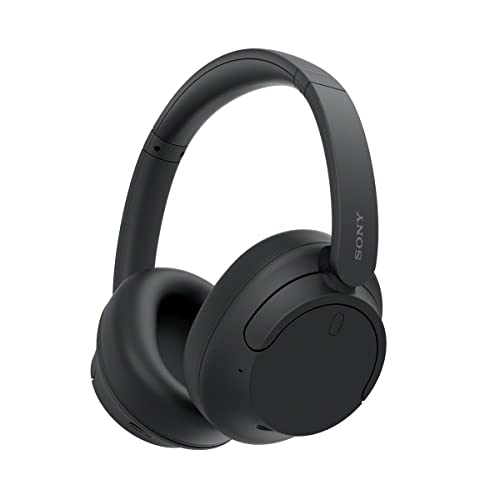
ASIN B0BS1QCFHX
Sony WH-CH720N (Black)
Physical +/− volume buttons are your priority during Bluetooth listening.
Last observed offer
$88.00
List Price: $179.99
- Confirm offer eligibility on Amazon
- Unavailable at last check
Size: One Size
Price checked
Observed condition: Not verified. Coupon and subscription requirements unverified.

ASIN B0FDKR293G
Bose QuietComfort Ultra Headphones (2nd Gen, Black)
You need the supported USB charging/listening workflow and accept swipe volume input.
Last observed offer
$359.99
List Price: $449.00
- Confirm offer eligibility on Amazon
Price checked
Observed condition: new. Coupon and subscription requirements unverified.
Prices are per listed package. Pickoryx may earn a commission from qualifying purchases through the paid Amazon links on this page, at no added cost to you.
Published by Pickoryx · Published 2026-10-09 · Source checked 2026-10-09 22:13 UTC
The main trade-off
Bose supports the charging-session workflow; Sony provides physical Bluetooth volume buttons.
Quick verdict
Choose Sony WH-CH720N for physical Bluetooth volume buttons if separate charging suits you. Choose Bose Ultra 2 for compatible USB listening while charging if swipe volume control suits you.
Choose Sony WH-CH720N (Black) if
- Physical +/− volume buttons are your priority during Bluetooth listening.
Choose Bose QuietComfort Ultra Headphones (2nd Gen, Black) if
- You need the supported USB charging/listening workflow and accept swipe volume input.
When the recommendation changes
- Both requirements are mandatory: neither meets both.
- Neither requirement matters: these differences do not establish a winner.
The differences that matter
| Decision point | Sony WH-CH720N (Black) | Bose QuietComfort Ultra Headphones (2nd Gen, Black) |
|---|---|---|
| Charging Listening Workflow | Starting a charge powers the WH-CH720N off; Sony blocks powered listening during the described charging connection.[1] | Compatible USB-C audio can play while the headphones charge.[4] |
What this changes: For desk listening during charging, choose Bose if your source supports USB audio; plan separate powered listening and charging with Sony.[1, 4] The better fit depends on your priorities | ||
| Bluetooth Volume Controls | Physical + and − buttons adjust Bluetooth volume; operation depends on the connected device and app.[2] | Volume is adjusted by swiping a capacitive strip.[4] |
What this changes: For ordinary Bluetooth listening, choose Sony if physical volume buttons are essential; choose Bose only if swipe input is acceptable.[2, 4] The better fit depends on your priorities | ||
Best for your routine
Physical volume input during Bluetooth listening
Best fit: Sony WH-CH720N (Black)
Based on listed features, not comparative testing.
Sony fits that input preference; allow a separate charging break.
USB listening during a charging session
Best fit: Bose QuietComfort Ultra Headphones (2nd Gen, Black)
Based on listed features, not comparative testing.
Bose fits that routine with a compatible source; accept its volume interface.
Value and trade-offs
One or both observed offers have eligibility conditions, so no unrestricted price difference is shown.
Any premium should buy a workflow you will use. If neither difference matters, this comparison gives no reason to pay more.
Price history is unavailable here, so we cannot recommend when to buy.
Limitations
- Manufacturer-documented feature fit only; no hands-on testing or overall performance ranking.
- USB audio needs a compatible source and cable. Listening during charging does not promise a gapless switch from an existing Bluetooth session.
- Sony’s power-off analog listening is a separate mode; the sources do not establish whether it can be combined with charging.
- This comparison concerns the Black versions. No current merchant offer or availability was verified.
Questions shoppers ask
Do Sony’s volume buttons also work with its analog cable?
No. Sony directs volume and playback control to the source device when the supplied headphone cable is connected. Its physical-button advantage here concerns Bluetooth use.
What if neither charging nor volume input decides it?
These two differences provide no winner. Compare the qualities that actually matter to you rather than paying for an unused workflow.
Methodology and sources
Compared the charging-session workflow and Bluetooth volume input, keeping analog controls separate.
AI assisted with research, source comparison and drafting.
View 5 sources
- 1.WH-CH720N: Charging the headsetSony · Official specifications · Source checked 2026-10-09 22:13 UTC
Evidence used on this page
- Hint and Note, lines 44–49: Charging shuts off powered use; playback is unavailable during the described charging connection.
- 2.WH-CH720N: Controlling the audio device (Bluetooth connection)Sony · Official specifications · Source checked 2026-10-09 22:13 UTC
Evidence used on this page
- Lines 15, 19, 28–34: Physical volume buttons; AVRCP and connected-device/app qualifications.
- 3.WH-CH720N: Using the supplied headphone cableSony · Official specifications · Source checked 2026-10-09 22:13 UTC
Evidence used on this page
- Lines 23 and 30–32: Power-off cable listening is supported; volume/playback buttons are unavailable when using the cable.
- 4.QuietComfort Ultra Headphones (2nd Gen), BlackBose · Official specifications · Source checked 2026-10-09 22:13 UTC
Evidence used on this page
- Selected Black; USB audio FAQ; controls FAQ; charging FAQ; listen-while-charging feature: Exact second-generation Black model: USB audio, listening during charging and swipe volume control.
- 5.WH-CH720N Wireless Noise Cancelling Headphone, BlackSony · Official specifications · Source checked 2026-10-09 22:13 UTC
Evidence used on this page
- Product heading and model, lines 301–312; Color, line 365: Black WH-CH720N/B identity.