
Roku Ultra (model 4850R) vs Fire TV Stick 4K Plus (2025)
Should you choose the Roku Ultra’s built-in Ethernet and included Voice Remote Pro, or the Fire TV Stick 4K Plus’s stick form and included Alexa Voice Remote, with Ethernet through an external dongle?
Products compared

ASIN B0DF44RTTP
Roku Ultra (model 4850R)
You want a player with built-in Ethernet instead of adding an external Ethernet dongle.
Last observed offer
$99.00
List Price: $149.99
- Confirm offer eligibility on Amazon
Price checked
Observed condition: new. Coupon and subscription requirements unverified.
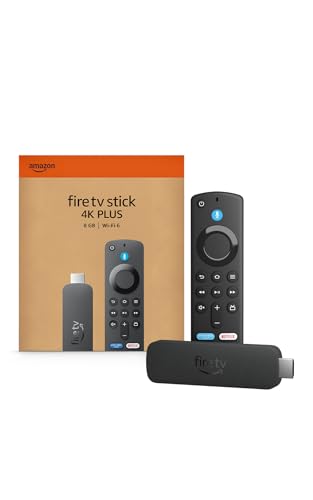
ASIN B0F7Z4QZTT
Fire TV Stick 4K Plus (2025)
A stick form factor and Wi-Fi setup fit your TV installation.
Last observed offer
$39.99
List Price: $69.99
Price checked
Observed offer ends
Observed condition: new. Coupon and subscription requirements unverified.
Prices are per listed package. Pickoryx may earn a commission from qualifying purchases through the paid Amazon links on this page, at no added cost to you.
Published by Pickoryx · Published 2026-10-15 · Source checked 2026-10-15 11:19 UTC
The main trade-off
The Roku Ultra includes Ethernet in the player and a rechargeable Voice Remote Pro; the Fire TV is a stick with Wi-Fi 6 and uses an external Ethernet dongle for wired networking, while its Alexa remote has preset app and compatible TV/audio controls.
Quick verdict
Choose the Roku Ultra if you want built-in Ethernet and its included rechargeable Voice Remote Pro with backlit buttons and a lost-remote finder. Choose the Fire TV Stick 4K Plus if you prefer a stick and its included Alexa remote; Amazon documents Wi-Fi 6 and Ethernet through an external dongle. These are setup and remote-feature differences, not tested performance results.
Choose Roku Ultra (model 4850R) if
- You want a player with built-in Ethernet instead of adding an external Ethernet dongle.
- You want the included rechargeable, backlit Roku Voice Remote Pro and its lost-remote finder.
Choose Fire TV Stick 4K Plus (2025) if
- A stick form factor and Wi-Fi setup fit your TV installation.
- You prefer the included Alexa remote’s preset app buttons and controls for power and volume on compatible TVs, soundbars, or receivers.
When the recommendation changes
- If a wired connection is required and you want it without an external dongle, favor the Roku Ultra; if you prefer the Fire TV stick and Wi-Fi setup, favor the Fire TV Stick 4K Plus.
- If remote charging and a lost-remote finder matter most, favor Roku; if Alexa voice commands and preset app buttons matter more, favor Fire TV.
The differences that matter
| Decision point | Roku Ultra (model 4850R) | Fire TV Stick 4K Plus (2025) |
|---|---|---|
| Network And Physical Setup Path | Roku Ultra lists built-in Wi-Fi 6 and Ethernet.[1] | Fire TV Stick 4K Plus (2025) lists Wi-Fi 6 and Ethernet through an external dongle.[2] |
What this changes: Roku provides the documented wired Ethernet path without an external dongle; Fire TV offers Wi-Fi setup and a wired path that uses the dongle.[1, 2] The better fit depends on your priorities | ||
| Network And Physical Setup Path | Roku lists Ultra player, Voice Remote Pro, USB-C remote charging cable, HDMI cable, and power adapter in the box.[1] | Amazon describes the Fire TV Stick as a stick and lists power cable/adapter, Alexa Voice Remote, AAA batteries, and optional HDMI extender; an HDMI input is required.[2, 3] |
What this changes: The included connection pieces differ; check the selected offer if the external Ethernet adapter is needed.[1, 2, 3] The better fit depends on your priorities | ||
| Remote Control And Access Workflow | Roku lists the Voice Remote Pro (2nd edition), rechargeable battery, backlit buttons, hands-free voice, lost remote finder, and shortcuts.[1] | Amazon lists the included Alexa Voice Remote, AAA batteries, Alexa button, preset app buttons, and compatible TV/audio power and volume control.[2, 3] |
What this changes: The included remotes offer different control features; select the set that matches the buyer’s preferred controls.[1, 2, 3] The better fit depends on your priorities | ||
Best for your routine
Built-in Ethernet without adding a network adapter
Best fit: Roku Ultra (model 4850R)
Based on listed features, not comparative testing.
Roku lists built-in Ethernet; Amazon says the Fire TV Stick 4K Plus requires an external Ethernet dongle for wired networking. This is a setup-fit recommendation, not a speed or stability result.
Alexa remote with preset app buttons and compatible TV/audio power and volume controls
Best fit: Fire TV Stick 4K Plus (2025)
Based on listed features, not comparative testing.
Amazon lists those controls for the included Alexa Voice Remote; choose it if those specific controls fit your routine.
Value and trade-offs
One or both observed offers have eligibility conditions, so no unrestricted price difference is shown.
Compare current offers when you shop; this comparison does not establish a price premium worth paying. The setup and remote features matter only if you will use them.
No price-history window was reviewed, so timing guidance is unavailable.
Limitations
- Pickoryx did not conduct hands-on testing. This comparison does not rank streaming speed, Wi-Fi stability, interface ease, picture quality, or reliability.
- Amazon documents Fire TV Stick 4K Plus Ethernet through an external dongle. The selected offer’s adapter inclusion was not checked; confirm the required accessory before choosing a wired setup.
- Roku lists 4K, HDR10+, Dolby Vision, and Dolby Atmos; Amazon lists 4K, Dolby Vision, HDR10+, and Dolby Atmos. This page does not compare playback quality, and compatible TV/content/audio equipment is required for supported formats.
Questions shoppers ask
Can either device use Ethernet?
Yes. Roku lists Ethernet built into the Ultra player. Amazon lists Ethernet for the Fire TV Stick 4K Plus through an external dongle; check the adapter and current offer contents if you need a wired connection.
What remote comes with each device?
Roku lists a Voice Remote Pro (2nd edition) with a USB-C charging cable. Amazon lists an Alexa Voice Remote and AAA batteries, with preset app buttons and power/volume controls for compatible TV and audio equipment.
Methodology and sources
Compared the Roku Ultra and Fire TV Stick 4K Plus using official manufacturer specifications and setup instructions for network/physical setup and included remote workflow. The recommendations are conditional feature-fit guidance; no speed, stability, ease, quality, or reliability tests were conducted.
AI assisted source research and writing; Pickoryx did not conduct hands-on testing.
View 3 sources
- 1.Roku Ultra | The ultimate streaming playerRoku · Official specifications · Source checked 2026-10-15 11:19 UTC
Evidence used on this page
- Model; What's in the box; networking; Voice Remote Pro features: Roku identifies model 4850R. The current product page lists built-in Wi-Fi 6 and Ethernet; the included Voice Remote Pro (2nd edition), USB-C charging cable, HDMI cable, and power adapter; and the remote's rechargeable power, backlit buttons, hands-free voice, lost-remote finder, and shortcut features.
- 2.Device Specifications: Fire TV Streaming Media PlayerAmazon Developer · Official support · Source checked 2026-10-15 11:19 UTC
Evidence used on this page
- Fire TV Stick 4K Plus (2025) Device Specifications; Fire TV Stick 4K Plus feature overview: Amazon identifies the retail name Fire TV Stick 4K Plus, release year 2025, Amazon.com marketplace, stick form factor, build model AFTMA08C15; lists Wi-Fi 6 and Ethernet with external dongle; and says it includes Alexa Voice Remote with dedicated power/volume controls for compatible TV, soundbar, and receiver.
- 3.How to Set Up Fire TV Stick 4K PlusAmazon Customer Service · Official support · Source checked 2026-10-15 11:19 UTC
Evidence used on this page
- Basic requirements; set up your device; remote overview: Amazon lists the Alexa Voice Remote, power cable/adapter, AAA remote batteries, and optional HDMI extender as in-box setup pieces; requires an available TV HDMI port; and describes Alexa voice commands and preset app buttons on the remote.