
Logitech Signature M650 L Wireless Mouse (Black) vs Logitech Signature Comfort Plus M850 L Wireless Mouse (Graphite)
Is the M650 L's documented Bluetooth-or-Logi-Bolt, one-channel setup a better fit than the M850 L's up-to-three-device Bluetooth Easy-Switch workflow?
Products compared
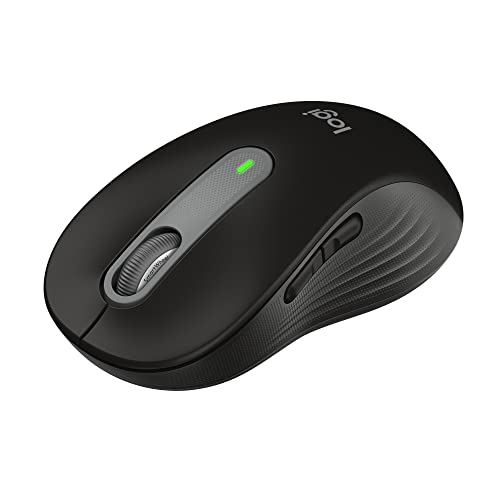
ASIN B09KX9P829
Logitech Signature M650 L Wireless Mouse (Black)
You want a mouse whose Logitech documentation confirms Bluetooth Low Energy and Logi Bolt receiver options.
Last observed offer
$39.99
- Confirm offer eligibility on Amazon
Size: (Pack of 1)
Price checked
Observed condition: new. Coupon and subscription requirements unverified.

ASIN B0GSHRCS7L
Logitech Signature Comfort Plus M850 L Wireless Mouse (Graphite)
You switch among two or three Bluetooth devices and want to select one with Easy-Switch rather than reconnecting a single-channel mouse.
Last observed offer
$49.99
- Confirm offer eligibility on Amazon
Size: One Size
Price checked
Observed condition: new. Coupon and subscription requirements unverified.
Prices are per listed package. Pickoryx may earn a commission from qualifying purchases through the paid Amazon links on this page, at no added cost to you.
Published by Pickoryx · Published 2026-10-20 · Source checked 2026-10-20 19:10 UTC
The main trade-off
The M650 L offers Bluetooth Low Energy or a Logi Bolt receiver on one connection channel and is specifically recommended for large-sized hands; the M850 L adds Bluetooth Easy-Switch for up to three devices and a built-in palm cushion, but no comparative comfort test establishes which shape will suit an individual better.
Quick verdict
The M850 L has documented Bluetooth Easy-Switch for up to three devices with a tap. Logitech documents Logi Bolt receiver support for the M650 L; the consumer M850 L page does not specify whether other connection methods are supported. Logitech also gives the M650 L an explicit large-hand size recommendation. Both offer SmartWheel scrolling and customizable buttons; the documented shapes do not establish a comfort winner.
Choose Logitech Signature M650 L Wireless Mouse (Black) if
- You want a mouse whose Logitech documentation confirms Bluetooth Low Energy and Logi Bolt receiver options.
- You want Logitech's specific M650 L recommendation for large-sized hands and prefer its contoured shape, soft thumb area, and rubber side grips.
Choose Logitech Signature Comfort Plus M850 L Wireless Mouse (Graphite) if
- You switch among two or three Bluetooth devices and want to select one with Easy-Switch rather than reconnecting a single-channel mouse.
- You prefer a mouse with a built-in palm cushion, thumb rest, and sculpted shape.
When the recommendation changes
- If moving between several computers or a computer and tablet is part of your daily routine, the M850 L's Easy-Switch feature becomes more useful.
- If you prefer a documented Logi Bolt receiver option, Logitech confirms it for the M650 L. The consumer M850 L page confirms Bluetooth Easy-Switch but leaves other connection methods unspecified.
- If hand fit is the deciding factor, compare the actual shape in person when possible: Logitech recommends the M650 L for large-sized hands, while the M850 L adds a palm cushion, but these descriptions do not predict which will feel better to you.
The differences that matter
| Decision point | Logitech Signature M650 L Wireless Mouse (Black) | Logitech Signature Comfort Plus M850 L Wireless Mouse (Graphite) |
|---|---|---|
| Connection And Device Workflow | The M650 L supports Bluetooth Low Energy or the included Logi Bolt receiver on one connection channel.[2, 3] | Logitech confirms the M850 L can connect through Bluetooth and use Easy-Switch across up to three devices with a tap; the consumer page says this works with no dongle needed. Other connection methods are not specified there.[4] |
What this changes: This is the clearest workflow difference: M850 L matches a multi-host setup, while M650 L has a documented Logi Bolt receiver option when a receiver is preferred or a computer lacks Bluetooth. Logitech confirms Bluetooth and Easy-Switch for the consumer M850 L, but its page does not specify other connection methods.[2, 3, 4] The better fit depends on your priorities | ||
| Controls And Hand Fit | Logitech recommends M650 L for large-sized hands. Its product page describes a contoured shape, soft thumb area, rubber side grips, SmartWheel, and five buttons including Back/Forward and wheel click; the side buttons can be customized in Logitech Options+.[1, 2] | M850 L has a sculpted shape, a built-in palm cushion, a thumb rest, extended rubber side grip, SmartWheel, and customizable buttons through Logi Options+; the product page does not state a button count.[4] |
What this changes: Both products provide SmartWheel scrolling and customizable controls. The choice is about the listed hand-contact features and how the buyer uses them: M650 L has the clearer large-hand sizing recommendation, while M850 L adds a palm cushion. Manufacturer descriptions do not prove relative comfort, fit for a particular hand, or control superiority.[1, 2, 4] The better fit depends on your priorities | ||
Best for your routine
Switching regularly among up to three Bluetooth devices
Best fit: Logitech Signature Comfort Plus M850 L Wireless Mouse (Graphite)
Based on listed features, not comparative testing.
The M850 L explicitly supports Easy-Switch among up to three Bluetooth devices with a tap; the M650 L uses one connection channel.
Choosing a model with a documented Logi Bolt option
Best fit: Logitech Signature M650 L Wireless Mouse (Black)
Based on listed features, not comparative testing.
Logitech documents the M650 L with Bluetooth Low Energy or an included Logi Bolt receiver. The consumer M850 L page confirms Bluetooth Easy-Switch, while leaving other connection methods unspecified.
Choosing between the published hand-contact designs
The better fit depends on your priorities
Logitech specifically recommends M650 L for large-sized hands; M850 L adds a palm cushion and sculpted shape. The published descriptions do not establish which shape feels better to a particular person.
Value and trade-offs
One or both observed offers have eligibility conditions, so no unrestricted price difference is shown.
A higher current M850 L offer is easier to justify when three-device Easy-Switch or its built-in palm cushion solves a real setup preference; the M650 L provides the Logi Bolt option and large-hand size recommendation. Check current offers for these exact models before buying.
The available price history does not establish a longer-term baseline. Recheck current prices, availability, and offer conditions for both exact models.
Limitations
- No hands-on comfort, fit, pointer-control, or long-term use comparison was performed; the recommendations are feature-fit choices, not claims that one mouse feels better or works faster.
- Logitech does not provide a directly comparable consumer-model specification set for the M850 L's dimensions on the product page. Dimensions are omitted, and the catalog's cached dimensions are not used.
- Logi Options+ button customization is listed for both models, but the M850 L product page does not state its button count; this comparison does not infer that one has more customizable buttons.
- Prices and availability can change; the available price history is not a long-term baseline.
Questions shoppers ask
Can the M650 L switch among three computers like the M850 L?
No. Logitech documents the M650 L with one connection channel, using Bluetooth Low Energy or its Logi Bolt receiver. The M850 L product page lists Easy-Switch among up to three Bluetooth devices.
Do both mice have customizable buttons and SmartWheel?
Yes. Logitech documents SmartWheel scrolling and customizable buttons for both. The M650 L page lists five total buttons; the M850 L page does not state a button count, so there is no supported button-count advantage here.
Which mouse will feel more comfortable in a large hand?
The available documentation cannot predict that for an individual. Logitech recommends M650 L for large-sized hands; M850 L adds a palm cushion, sculpted shape, and thumb rest. Try the shape if hand fit is decisive.
Methodology and sources
The comparison follows the product-specific connection and control descriptions from Logitech. It does not infer comfort, pointer-control quality, or performance superiority from the shape descriptions or cached dimensions.
Research assistance organized manufacturer-published specifications and support steps; no mouse was physically tested.
View 4 sources
- 1.Signature M650 Wireless Mice - Small, Large, Left Handed MouseLogitech US · Official specifications · Source checked 2026-10-20 18:46 UTC
Evidence used on this page
- Specs and Compatibility; Key Features; page lists Black Signature M650 L part number 910-006265.: The US product family page identifies the M650 L size and exact black part number 910-006265, recommends M650 L for large-sized hands, lists its dimensions and five-button layout, and describes Logi Options+ customization, SmartWheel and Bluetooth/Logi Bolt connectivity.
- 2.Getting Started - Signature M650Logitech Support · Official support · Source checked 2026-10-20 18:46 UTC
Evidence used on this page
- Connect your mouse to your device; Product Overview; SmartWheel; Back/Forward buttons and button customization. The guide covers Signature M650 and M650L.: Logitech explains Bluetooth Low Energy and Logi Bolt setup, describes channel 1 pairing, lists the connect button, SmartWheel and Back/Forward buttons, and shows side-button customization through Options+.
- 3.Specification - Signature M650LLogitech Support · Official support · Source checked 2026-10-20 19:10 UTC
Evidence used on this page
- General Product Specifications and Mouse Specifications: Wireless Protocol and Connection Type.: The exact M650L support page specifies Bluetooth Low Energy plus Logi Bolt and a one-channel connection. Its listed dimension values conflict with Logitech's US product page, so no dimensions from this support page are used.
- 4.Signature Comfort Plus M850 LLogitech US · Official specifications · Source checked 2026-10-20 18:45 UTC
Evidence used on this page
- Description and All day comfort sections; Easy-Switch and Bluetooth; customization and shape feature descriptions.: The exact US consumer product page identifies Signature Comfort Plus M850 L and documents Bluetooth, Easy-Switch among up to three devices, and use without a dongle. It does not specify other connection methods, a button count or numeric dimensions in the accessible product text. This is the consumer model, distinct from M850 L for Business.