
Kindle Scribe Colorsoft (1st Generation), 32GB, Graphite vs reMarkable Paper Pro with Marker Plus
Do you mainly need on-device access to a Kindle library, or direct handwriting on USB-loaded PDFs with a documented transfer and export route?
Products compared
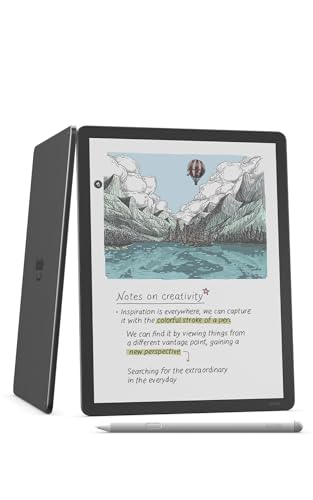
ASIN B0DWRBVDN6
Kindle Scribe Colorsoft (1st Generation), 32GB, Graphite
Most of your reading comes from your Kindle library, and on-device Kindle Store search matters.
Last observed offer
$629.99
- Confirm offer eligibility on Amazon
Price checked
Observed condition: new. Coupon and subscription requirements unverified.

ASIN B0DG9ZXWMK
reMarkable Paper Pro with Marker Plus
You need direct handwriting on PDFs loaded by USB, which Amazon says Kindle Scribe does not support.
Last observed offer
$679.00
- Confirm offer eligibility on Amazon
Size: reMarkable Paper Pro Bundle
Price checked
Observed condition: new. Coupon and subscription requirements unverified.
Prices are per listed package. Pickoryx may earn a commission from qualifying purchases through the paid Amazon links on this page, at no added cost to you.
Published by Pickoryx · Published 2026-10-21 · Source checked 2026-10-21 21:21 UTC
The main trade-off
Kindle library/store search and notes on eligible Kindle or Send-to-Kindle items versus Paper Pro handwriting on USB-loaded PDFs and its documented transfer/export route. Both support personal-document workflows, but their annotation routes differ.
Quick verdict
Choose the Colorsoft if on-device Kindle-library and Store access matters most. Both devices support personal-document workflows; Paper Pro is the closer fit when you need direct handwriting on USB-loaded PDFs and its documented transfer/export path, while Colorsoft can mark up eligible Send-to-Kindle files and cloud imports with a separate annotated-copy return step.
Choose Kindle Scribe Colorsoft (1st Generation), 32GB, Graphite if
- Most of your reading comes from your Kindle library, and on-device Kindle Store search matters.
- You annotate Kindle books or eligible Send-to-Kindle documents, and can use a separate annotated-PDF copy when returning cloud-drive imports.
Choose reMarkable Paper Pro with Marker Plus if
- You need direct handwriting on PDFs loaded by USB, which Amazon says Kindle Scribe does not support.
- The documented Paper Pro app, web or USB transfer and PDF-export steps fit your file workflow.
When the recommendation changes
- If direct handwriting on USB-loaded PDFs is a must, Paper Pro is the closer fit: Amazon excludes USB-loaded PDFs from Kindle Scribe handwriting, while reMarkable documents PDF annotation and transfer/export paths.
- If your must-have is a specific Kindle-purchased title on Paper Pro, verify that title's transfer and DRM compatibility first; the sources here do not establish it.
- If you import through Google Drive or OneDrive on the Colorsoft, account for Amazon's note that annotations do not sync back to the original cloud file automatically.
The differences that matter
| Decision point | Kindle Scribe Colorsoft (1st Generation), 32GB, Graphite | reMarkable Paper Pro with Marker Plus |
|---|---|---|
| Library Audio And File Acquisition | The Colorsoft guide describes on-device Kindle-library, Kindle Store and Audible Store search. It also lists Send-to-Kindle document formats and Google Drive/OneDrive imports, so personal files are not exclusive to Paper Pro; store and feature availability can vary by location and title.[1] | Paper Pro imports PDF and EPUB files through documented mobile/desktop app, web or USB routes.[4, 5, 6] |
What this changes: Choose the Colorsoft when on-device Kindle-library and Store access is central. Both devices have documented personal-document routes, so PDF/EPUB support alone does not decide the pair; the annotation path and return workflow do. The sources do not establish Kindle Store/DRM transfer to Paper Pro.[1, 4, 5, 6] The better fit depends on your priorities | ||
| Annotation And Document Workflow | Scribe can write on certain Send-to-Kindle books and PDFs; USB-loaded PDFs do not support handwriting. On Google Drive/OneDrive imports, notes do not sync back to the source drive automatically; Amazon says to upload an annotated PDF copy.[2, 3] | Paper Pro documents handwriting and annotation on PDFs, PDF/EPUB import and PDF export. Its supported app, web and USB transfer routes give a buyer a documented path for bringing in a USB-loaded PDF, marking it up and exporting it; converting supported PDFs into editable notebooks in the web app requires Connect.[4, 5, 6, 7] |
What this changes: If direct handwriting on a USB-loaded PDF is essential, Paper Pro is the closer fit because Amazon excludes USB-loaded PDFs from Kindle Scribe handwriting. If notes on Kindle books, eligible Send-to-Kindle PDFs or cloud imports are enough, Colorsoft supports those routes; cloud-drive annotations require uploading a separate annotated PDF copy.[2, 3, 4, 5, 6, 7] The better fit depends on your priorities | ||
Best for your routine
Read from and search an existing Kindle library on the device
Best fit: Kindle Scribe Colorsoft (1st Generation), 32GB, Graphite
Based on listed features, not comparative testing.
Amazon's Colorsoft guide documents device search across the Kindle library and Kindle Store; this fits a reader whose current book workflow is already there.
Handwrite on USB-loaded PDFs, then use a documented file-transfer and PDF-export route
Best fit: reMarkable Paper Pro with Marker Plus
Based on listed features, not comparative testing.
Amazon excludes USB-loaded PDFs from Kindle Scribe handwriting. Paper Pro documents PDF annotation, app/web/USB transfer options and PDF export. This is a route-specific fit, not a claim that Paper Pro is better for every PDF/EPUB workflow or has better handwriting performance.
Value and trade-offs
One or both observed offers have eligibility conditions, so no unrestricted price difference is shown.
Do not assume either model is consistently the pricier choice; a current price difference only matters if the matching library or document workflow is useful to you.
There isn't enough price history to tell whether either current offer is unusually low. Compare the exact item, seller, and condition when you're ready to buy.
Limitations
- Audible availability and some Kindle features vary by location and title; confirm the exact U.S. account and audiobook needs before buying.
- Amazon's official support describes direct handwriting on only certain Send-to-Kindle PDFs and excludes USB-loaded PDFs; do not assume every Kindle PDF can be marked up.
- The reMarkable sources reviewed do not establish whether Kindle Store purchases or DRM-protected Kindle books can be transferred to Paper Pro. Verify exact-title compatibility rather than assuming either support or absence.
- Some Paper Pro web workflows, including converting supported PDFs into editable notebooks, require Connect; ordinary PDF/EPUB import is documented separately.
- No physical writing, display, speed, comfort, or battery comparison was performed. The recommendations are limited to official documented workflows.
Questions shoppers ask
Can I handwrite on any PDF with Kindle Scribe Colorsoft?
No. Amazon says handwriting is available on certain PDFs imported through Send to Kindle, but not on PDFs loaded by USB-C or older documents already in the library before November 11, 2022. Check the file's route before relying on direct page writing.
Does Paper Pro require Connect to import PDFs?
The support pages list PDF/EPUB import and app, web and USB transfer. Connect is required for the web app's Convert to Notebook option for supported PDFs; that is a separate editable-notebook workflow.
Can I move Kindle Store purchases to Paper Pro?
The sources reviewed do not establish that Kindle Store books can be transferred to Paper Pro. Confirm the exact book's file and DRM compatibility before choosing based on an existing Kindle purchase library.
Methodology and sources
Compared the U.S. Colorsoft guide's library and file-entry paths with Paper Pro's documented PDF/EPUB formats, annotation tools, transfer options and account sync. Unknown Kindle DRM transfer and unsupported performance claims remain unresolved.
Automation helped locate and organize official product documentation; no device was physically tested.
View 8 sources
- 1.Kindle Scribe Colorsoft (1st Generation) User Guide — American EnglishAmazon Kindle · Official support · Source checked 2026-10-21 21:21 UTC
Evidence used on this page
- Search Bar and Store; Importing documents; Connecting cloud drives; country-availability note: The exact US English guide identifies Kindle Scribe Colorsoft (1st Generation). It documents searching the Kindle library and Kindle/Audible stores; Send to Kindle accepts listed personal-document formats; it also describes connecting Google Drive and Microsoft OneDrive. Some Kindle features vary by country or location.
- 2.Kindle Personal Document File Types That Support NotesAmazon Kindle Support · Official support · Source checked 2026-10-21 21:21 UTC
Evidence used on this page
- Notes for Kindle Scribe; Send-to-Kindle PDF note; USB-C and prior-library PDF exception: Amazon's Kindle Scribe support page says supported Send-to-Kindle personal documents include direct writing on certain PDFs; handwriting isn't supported on PDFs loaded by USB-C or documents previously sent to the library before 2022-11-11. The page covers Kindle Scribe generally; the Colorsoft (1st Generation) guide describes the selected model's document workflows.
- 3.Import Files from Google Drive or Microsoft OneDrive to Kindle ScribeAmazon Kindle Support · Official support · Source checked 2026-10-21 21:21 UTC
Evidence used on this page
- Requirements and Important note on annotated imported files: The feature requires a Kindle Scribe released in 2025 or later, an Amazon account, internet access, and a Google or Microsoft account. Notes and highlights on imported files do not sync back to the cloud drive; Amazon says an annotated PDF copy can be uploaded back. The Colorsoft (1st Generation) guide describes Google Drive and OneDrive imports on that model.
- 4.reMarkable Paper Pro — Features and specificationsreMarkable · Official specifications · Source checked 2026-10-21 21:21 UTC
Evidence used on this page
- Features and specifications; Software document support; apps and cloud storage: The model-specific manufacturer page describes Paper Pro's writing and annotation tools, folders/tags/search, connected apps, PDF and EPUB importing, and PDF/PNG/SVG export. Technical features only are used; no regional retail, shipping or price details are used.
- 5.About reMarkable Paper ProreMarkable Support · Official support · Source checked 2026-10-21 21:21 UTC
Evidence used on this page
- Article applicability note; software supported file formats: The support page explicitly states it pertains to reMarkable Paper Pro and lists PDF/EPUB as import formats and PDF/SVG/PNG as export formats. It also identifies the Paper Pro model's apps.
- 6.Importing and exporting filesreMarkable Support · Official support · Source checked 2026-10-21 21:21 UTC
Evidence used on this page
- Supported file types; mobile/desktop/web/USB transfer; export and sync: Current reMarkable support documents PDF and EPUB transfer through mobile or desktop apps, the web app, or USB, along with export and syncing. Paper Pro-specific support lists the model's supported formats; together these pages document its file-transfer workflow. They do not establish transfer of Kindle-protected books.
- 7.Web appreMarkable Support · Official support · Source checked 2026-10-21 21:21 UTC
Evidence used on this page
- Upload files; Import PDFs; Limitations: The support page describes PDF/EPUB upload to the reMarkable library and syncing to connected paper tablets; it says converting supported PDFs to editable notebooks requires Connect. This is an optional workflow and is not described as required for ordinary PDF upload.
- 8.Markers for reMarkablereMarkable Support · Official support · Source checked 2026-10-21 21:21 UTC
Evidence used on this page
- Compatibility; Marker Plus specifications and FAQ: The support page confirms Marker Plus compatibility with Paper Pro and its built-in eraser, distinguishing it from the standard Marker. The Paper Pro with Marker Plus bundle therefore has a documented pen configuration.