
Dell Pro 14 Plus Portable Monitor P1425 vs Lenovo ThinkVision M14t Gen 2
Should I pay for the Lenovo's touch workflow, or choose Dell's anti-glare screen for my work lighting?
Products compared

ASIN B0CPGQR617
Dell Pro 14 Plus Portable Monitor P1425
You want an anti-glare portable second screen and do not need touch input.
Last observed offer
$234.30
- Confirm offer eligibility on Amazon
Price checked
Observed condition: new. Coupon and subscription requirements unverified.
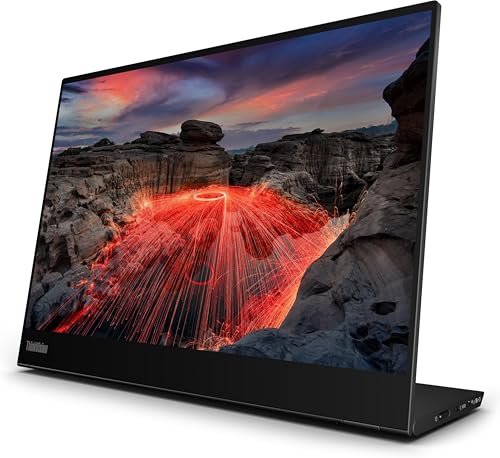
ASIN B0D58LQ7X4
Lenovo ThinkVision M14t Gen 2
You will use direct touch or stylus input, and your laptop or device supports the Lenovo's touch workflow.
Last observed offer
$287.99
- Confirm offer eligibility on Amazon
Price checked
Observed condition: new. Coupon and subscription requirements unverified.
Prices are per listed package. Pickoryx may earn a commission from qualifying purchases through the paid Amazon links on this page, at no added cost to you.
Published by Pickoryx · Published 2026-10-21 · Source checked 2026-10-21 22:15 UTC
The main trade-off
The Lenovo adds 10-point touch and a passive touch pen in Lenovo's family bundle, with an active pen sold separately; the Dell has no touchscreen but is anti-glare and RTINGS describes better reflection handling in a well-lit room.
Quick verdict
Choose the Lenovo if direct touch or stylus markup is part of your workflow and your host supports the functions you need; confirm whether the exact offer includes the passive pen and adapter. Choose the Dell when touch is unnecessary and your portable screen will sit in a bright indoor workspace: RTINGS found it better at handling reflections, while the Lenovo's glossy finish looked clearer in controlled lighting. Neither is a safe pick for a display facing a sunny window.
Choose Dell Pro 14 Plus Portable Monitor P1425 if
- You want an anti-glare portable second screen and do not need touch input.
- Your work spot is bright but not directly in front of a sunny window, where RTINGS says this matte screen can still be hard to see.
Choose Lenovo ThinkVision M14t Gen 2 if
- You will use direct touch or stylus input, and your laptop or device supports the Lenovo's touch workflow.
- You prefer the Lenovo's glossy, clearer-looking image and can control reflections at your desk; check the seller's exact pen and adapter bundle first.
When the recommendation changes
- If you need pressure-sensitive active-pen input, verify a compatible separately sold pen rather than assuming the included passive stylus provides pressure sensitivity.
- If either screen will face direct sunlight, treat both as uncertain fits and test the intended position if possible.
- The Lenovo datasheet describes family-level packaging and regional variation; verify the selected seller's exact box contents, adapter and support terms.
The differences that matter
| Decision point | Dell Pro 14 Plus Portable Monitor P1425 | Lenovo ThinkVision M14t Gen 2 |
|---|---|---|
| Touch And Pen Workflow | Dell lists no touchscreen for the P1425.[1] | The ThinkVision M14t Gen 2 supports 10-point touch. Lenovo's family datasheet lists a passive touch pen and says an active stylus is sold separately; this does not confirm the selected seller's box contents.[2, 3] |
What this changes: If you mark up documents or interact directly with a second screen, Lenovo has the sourced touch capability that Dell lacks. The included passive stylus is not the separately sold active stylus, so confirm the exact kit and supported host before relying on pen features.[1, 2, 3] Best fit: Lenovo ThinkVision M14t Gen 2 | ||
| Ambient Light And Screen Surface | Dell specifies an anti-glare screen and 400 nit brightness; RTINGS' direct comparison describes better reflection handling in a well-lit room, but says the matte screen can be hard to see directly in front of a sunny window.[1, 4] | Lenovo lists 300 cd/m² panel brightness / 270 cd/m² set brightness. RTINGS describes its glossy finish as clearer-looking but more reflective, and less suited to a bright room.[2, 5] |
What this changes: For a bright indoor workspace where touch is not needed, Dell has the more useful tested fit. For a controlled-light desk where the buyer values the Lenovo's glossy image and touch features, its finish may be preferable. Direct sunlight remains a limitation rather than a guaranteed win for either screen.[4, 5] The better fit depends on your priorities | ||
Best for your routine
Signing documents or marking up work directly on the portable monitor
Best fit: Lenovo ThinkVision M14t Gen 2
Based on listed features, not comparative testing.
Lenovo specifies 10-point touch and includes a passive touch pen in its family bundle; Dell lists no touchscreen. Check the exact seller package and host compatibility before ordering.
A bright indoor desk where touch is not needed
Best fit: Dell Pro 14 Plus Portable Monitor P1425
RTINGS' same-bench exact-model comparison says Dell handles reflections better in a well-lit room; its matte screen can still struggle directly in front of a sunny window.
Value and trade-offs
One or both observed offers have eligibility conditions, so no unrestricted price difference is shown.
If Lenovo's current offer is higher, its touch workflow only justifies the difference if you will use it and have confirmed the host and stylus setup. If Dell's current offer is higher, weigh its anti-glare display and tested bright-room fit against the Lenovo's touch features using the current exact offers.
Only current offer observations are available here, so there is not enough price history to make a Buy Now or Wait recommendation.
Limitations
- Lenovo's manufacturer documents describe the M14t Gen 2 family and distinguish the passive stylus from the separately sold active stylus; they do not verify the exact marketplace seller's box contents, adapter or regional support terms. Confirm these details before ordering.
- Lenovo says display-management software functions vary by system. Confirm your host's USB-C video support and operating-system behavior before buying for touch use; this comparison does not promise Mac touch compatibility.
- RTINGS' lighting observations come from its own portable-monitor test conditions and do not guarantee visibility at every angle or in direct sunlight.
- Pickoryx did not perform hands-on testing. No touch-accuracy, pressure-input, color-accuracy, reliability, eye-health or universal outdoor-visibility conclusion is made.
- Current offers can change. The available price observations do not establish a historical baseline or buying time.
Questions shoppers ask
Does the ThinkVision M14t Gen 2 include an active pen?
Lenovo's family datasheet says a passive stylus is included and an active stylus is sold separately. The passive pen should not be assumed to provide the active pen's pressure features. Verify the exact listing bundle and compatible pen before ordering.
Which monitor should I use in front of a sunny window?
Neither is a dependable choice based on the available test notes: RTINGS says the Dell's matte screen can still be hard to see directly in front of a sunny window and describes distracting reflections on the Lenovo's glossy screen. If possible, test the position before buying.
Methodology and sources
I compared the listed touch and pen setup with the two exact-model RTINGS reviews, which use the same portable-monitor test bench version. Lighting comments describe those review conditions and are not a guarantee for every room.
I checked the manufacturers' published specifications and RTINGS' exact-model reviews. Pickoryx did not test either monitor.
View 5 sources
- 1.Dell Pro P 14 Portable Monitor - P1425 | Dell USADell Technologies · Official specifications · Source checked 2026-10-21 22:15 UTC
Evidence used on this page
- Product title and manufacturer part number; Tech Specs: Touch Screen, Features and Brightness: Dell's US page identifies P1425 / manufacturer part 6TYGG, lists no touchscreen, an anti-glare feature and 400 nit brightness.
- 2.ThinkVision M14t Gen 2 — Product Specifications ReferenceLenovo · Official specifications · Source checked 2026-10-21 21:58 UTC
Evidence used on this page
- Performance: Brightness; Design: Touchscreen; Special Features: Lenovo Accessories and Display Manager: The exact M14t Gen 2 family reference specifies 10-point touch, 300 cd/m² panel / 270 cd/m² set brightness, and notes software functions vary by operating system.
- 3.Lenovo ThinkVision M14t Gen 2 Monitor — DatasheetLenovo · Official specifications · Source checked 2026-10-21 21:58 UTC
Evidence used on this page
- Pen/Digitizer; What's in the Box; footnotes 2, 4, 5 and 6: Lenovo lists a passive touch pen and says the passive stylus is included while an active stylus and AC/DC adapter are sold separately; compatible USB-C host and software behavior vary by system.
- 4.Dell P1425 Monitor ReviewRTINGS.com · Independent testing · Source checked 2026-10-21 21:58 UTC
Evidence used on this page
- Review header: Test Bench 2.2; direct comparison under Popular Monitor Comparisons: RTINGS identifies an exact P1425 unit reviewed on Test Bench 2.2 and says Dell handles reflections better in a well-lit room than the compared Lenovo, while noting the matte screen can struggle in front of a sunny window.
- 5.Lenovo ThinkVision M14t Gen 2 Monitor ReviewRTINGS.com · Independent testing · Source checked 2026-10-21 22:15 UTC
Evidence used on this page
- Review header: Test Bench 2.2; direct comparison under Popular Monitor Comparisons: RTINGS identifies the exact M14t Gen 2, says the review uses Methodology v2.2, and describes distracting reflections and limited brightness in well-lit rooms; its direct comparison names the Dell P1425.