
Brother P-touch PT-D610BT (US model) vs Brother P-touch CUBE Plus PT-P710BT (US model)
Would on-device keyboard entry and an included AC adapter be more useful than a smaller rechargeable cube designed around app or computer input?
Products compared
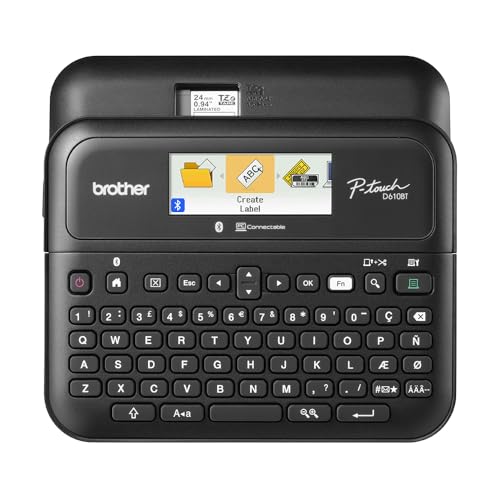
ASIN B0B1KZJXPG
Brother P-touch PT-D610BT (US model)
You want a QWERTY keyboard and color backlit screen on the label maker for typing and previewing a simple label without starting with an app or PC.
Last observed offer
$114.99
- Confirm offer eligibility on Amazon
Size: Standard
Price checked
Observed condition: new. Coupon and subscription requirements unverified.

ASIN B07HB8LNSY
Brother P-touch CUBE Plus PT-P710BT (US model)
You are comfortable designing labels on a phone, tablet or computer and sending them by Bluetooth or USB rather than typing on the printer.
Last observed offer
$114.99
- Confirm offer eligibility on Amazon
Size: One Size
Price checked
Observed condition: new. Coupon and subscription requirements unverified.
Prices are per listed package. Pickoryx may earn a commission from qualifying purchases through the paid Amazon links on this page, at no added cost to you.
Published by Pickoryx · Published 2026-11-05 · Source checked 2026-11-05 15:59 UTC
The main trade-off
PT-D610BT provides an on-device keyboard/display and Brother lists an AC adapter in the box; PT-P710BT shifts label design to apps or PC, uses a built-in rechargeable battery and has a smaller/lighter body. Their standard tape samples also differ.
Quick verdict
Pick PT-D610BT if you want to type and preview a basic label at the printer itself, and value its included AC adapter for a fixed station; it can also run on six AA batteries, which are not included. Pick the compact PT-P710BT if you prefer composing labels on a phone or computer and want its built-in rechargeable Li-ion battery and smaller body. Brother’s US standard-package lists show one standard 24 mm tape for PT-D610BT and two sample tapes, including glitter gold, for PT-P710BT. Both support Brother TZe media up to 24 mm. These are documented workflow and package differences, not a test of print quality or battery life.
Choose Brother P-touch PT-D610BT (US model) if
- You want a QWERTY keyboard and color backlit screen on the label maker for typing and previewing a simple label without starting with an app or PC.
- You want Brother’s PT-D610BT standard box list to include an AC adapter, or value the option of six AA batteries when away from an outlet.
Choose Brother P-touch CUBE Plus PT-P710BT (US model) if
- You are comfortable designing labels on a phone, tablet or computer and sending them by Bluetooth or USB rather than typing on the printer.
- You want the smaller body and built-in rechargeable Li-ion battery, or would use the included white and glitter-gold TZe sample tapes.
When the recommendation changes
- Your labeling workflow depends on stored or database-driven jobs, templates or shared use; confirm the exact software and saved-label steps you need in each model's manual before choosing.
- Your regular work uses tape types, sizes or consumables outside the Brother-documented TZe widths; confirm exact cassette compatibility before purchase.
- Your exact seller package differs from Brother's US standard carton-content list; use the seller's confirmed contents when deciding which sample tape or power accessory you will have.
The differences that matter
| Decision point | Brother P-touch PT-D610BT (US model) | Brother P-touch CUBE Plus PT-P710BT (US model) |
|---|---|---|
| Standalone Keyboard Display Vs App Pc Entry | PT-D610BT has a QWERTY keyboard, full-color backlit two-line display and quick formatting keys; Brother says it can type a label at the unit and can also use PC or mobile software.[1] | PT-P710BT’s exact-model specifications list no LCD and no keyboard. Brother directs label creation through its mobile apps or P-touch Editor on a computer, with Bluetooth and supplied USB connectivity.[2, 3] |
What this changes: Choose PT-D610BT if you want the printer itself to be the text-entry and preview surface; choose PT-P710BT if app or PC design is already your preferred way to make labels.[1, 2, 3] The better fit depends on your priorities | ||
| Power Setup And Portability | PT-D610BT’s Brother USA package list includes an AC adapter; the specifications also allow six AA batteries, which are not included. Listed unit size is 8.0 x 7.7 x 3.4 in.[1] | PT-P710BT’s Brother USA box list names a built-in Li-ion battery and USB cable. The listed unit size is 5 x 2.6 x 5 in; the standard contents list does not name an AC adapter.[2, 3] |
What this changes: PT-D610BT fits a desk where the included AC adapter is useful and offers an AA-battery alternative; PT-P710BT is smaller on Brother’s listed dimensions and uses a rechargeable battery. The P710BT package list supports USB charging, but does not establish what any separate seller bundle includes beyond Brother’s standard contents.[1, 2, 3] The better fit depends on your priorities | ||
| Tze Media Compatibility And Standard Samples | Brother lists TZe tape compatibility up to 24 mm and one included black-on-white standard laminated 24 mm x 4 m sample tape for PT-D610BT.[1] | Brother’s PT-P710BT manual lists TZe widths through 24 mm; its US standard package lists a black-on-white 24 mm x 4 m starter tape and a black-on-premium-glitter-gold 24 mm x 2 m starter tape.[2, 3] |
What this changes: Both support 24 mm TZe labels. The documented standard sample set differs: PT-D610BT has a plain laminated sample, while PT-P710BT adds a short glitter-gold sample; choose by the tape types you would actually use and confirm the seller carton contents.[1, 2, 3] The better fit depends on your priorities | ||
Best for your routine
Typing and previewing a basic label at the printer
Best fit: Brother P-touch PT-D610BT (US model)
Based on listed features, not comparative testing.
PT-D610BT has the documented QWERTY keyboard and color backlit display; PT-P710BT has no keyboard or LCD and is designed around mobile or computer software.
A smaller rechargeable label printer for app or PC design
Best fit: Brother P-touch CUBE Plus PT-P710BT (US model)
Based on listed features, not comparative testing.
PT-P710BT’s listed footprint is smaller and Brother lists a built-in rechargeable Li-ion battery; this is a feature-fit choice, not a battery-life or portability test.
Using Brother TZe tape up to 24 mm
No clear winner
Both exact US product pages/manuals support TZe media through 24 mm; the standard in-box sample tapes differ by model.
Value and trade-offs
One or both observed offers have eligibility conditions, so no unrestricted price difference is shown.
Compare the current live offers and the features or included tapes you will use. This result makes no stable price or total-ownership-cost claim.
Price observations are current-only with no usable historical series, so they are insufficient for timing advice. Recheck the live offer at purchase time.
Limitations
- No hands-on test was performed. This is a manufacturer-documented workflow and standard-package comparison, not a measured print-quality, cut-time, noise, ease-of-use or reliability comparison.
- Brother’s US standard carton-content lists may differ from the exact seller offer tied to an Amazon ASIN; confirm package contents when an included tape or power accessory affects the purchase.
- The PT-P710BT Brother USA page contains generic CUBE XP copy that mentions wider tape than the exact PT-P710BT specifications. This comparison uses the exact PTP710BT specification and its User’s Guide, which list TZe tape up to 24 mm; it does not rely on the wider generic copy.
- No evidence here compares real battery runtime, label output quality, speed, noise or ease of use.
Methodology and sources
Compared on-device input, app/PC workflow, power options, published dimensions, TZe width limits and the manufacturer's standard box lists. Product facts are kept separate from seller-specific bundle contents. No comparative print-quality or battery-runtime result is inferred.
Automation assisted with source organization and structured drafting; neither printer was operated or measured.
View 3 sources
- 1.P-touch PTD610BT Business Professional Connected Label MakerBrother USA · Official specifications · Source checked 2026-11-05 15:59 UTC
Evidence used on this page
- Exact Brother USA PTD610BT page: built-in QWERTY and color 20-character x 2-line display; direct keyboard entry; apps/PC connectivity; box lists one 24 mm x 4 m black-on-white TZe sample, AC adapter and USB cable; specifications list 6 AA batteries not included, adapter included, 24 mm max tape, dimensions and unit weight.: Exact US PT-D610BT manufacturer product page used for hardware, power, software routes and standard carton contents. It does not establish content of a reseller-specific bundle beyond Brother's standard list.
- 2.P-touch CUBE Plus PTP710BT Bluetooth Connected Label MakerBrother USA · Official specifications · Source checked 2026-11-05 15:59 UTC
Evidence used on this page
- Exact US PTP710BT page: apps/PC design and Bluetooth/USB workflow; exact specification table lists no display/no keyboard, 24 mm max width, size/weight; carton list includes two tape samples, built-in Li-ion battery and USB cable. A lower generic CUBE XP paragraph conflicts on width and is not used.: Exact US product page; detailed model-specific specs and carton list support the claims. The page also contains generic CUBE XP text with a wider width claim; that conflicting copy is explicitly excluded and the 24 mm value is corroborated by the exact-model manual.
- 3.PT-P710BT User’s Guide (English)Brother Support / Brother USA · Official support · Source checked 2026-11-05 15:59 UTC
Evidence used on this page
- Brother US support page links this English model-specific guide. Supplies lists compatible TZe widths 3.5, 6, 9, 12, 18 and 24 mm; contents describe charging the rechargeable Li-ion battery and separate mobile-device vs computer print workflows.: Model-specific Brother PT-P710BT User’s Guide linked from the United States manuals page; used to verify tape widths and supported setup/charging workflow.